
Ultrawide Monitor vs Dual Monitor: Which Setup Is Better?
Ultrawide Monitor vs. Dual Monitor: Which Setup Is Better?
What may seem like a simple decision, choosing between an ultrawide monitor vs. a dual monitor, can actually be a pretty big decision. The type of monitor you get can significantly influence your gaming experience and overall desk layout. Both options give you extra screen space, but ultimately, each one has its own pros and cons.
Our guide compares ultrawide monitors vs. dual monitors to help you determine which is best for your gaming setup based on your needs and the space you have.
Ultrawide vs. Dual Monitor: The Basics
Before making your final decision, you should have a somewhat basic idea of what an ultrawide monitor and a dual monitor are.
What Is a Dual Monitor Setup?
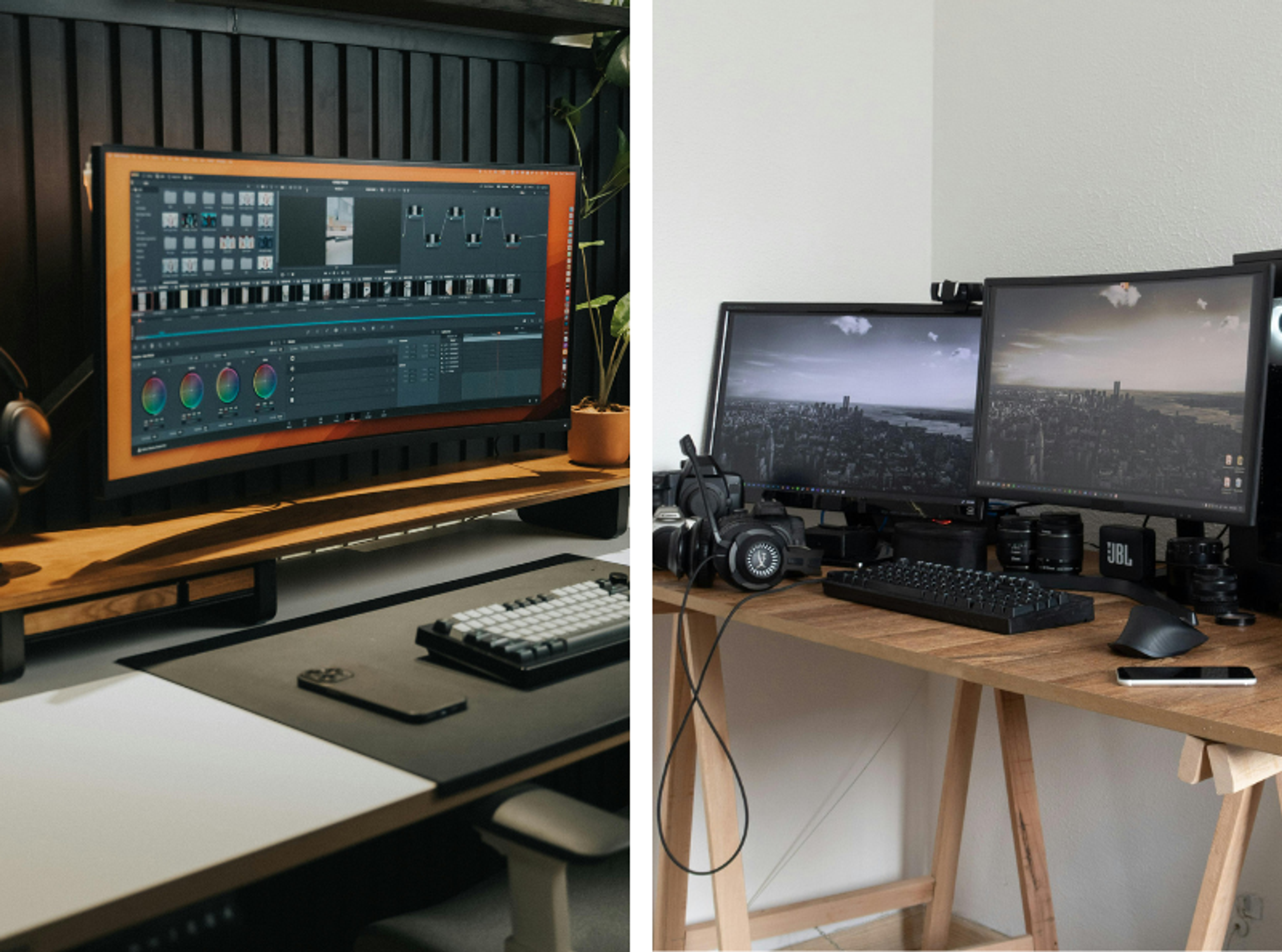
A dual-monitor setup consists of two displays positioned side by side to extend your screen space. Most people pair two 16:9 monitors, typically 1080p, 1440p, or 4K, with the displays matching in resolution. Sometimes they may use different ones depending on their preference and budget.
Dual monitors are often connected via daisy-chaining, with a single cable running from the PC to the first monitor and another from the first to the second. Daisy-chaining simplifies cable runs and reduces workspace clutter. Since each monitor operates independently, dual displays offer significant flexibility in arrangement, window placement, and multitasking.
What Is an Ultrawide Monitor?
An ultrawide monitor uses a 21:9 aspect ratio for significantly more horizontal screen space than standard monitors. This expanded view makes them appealing for creatives and gamers who want uninterrupted screen real estate.
Instead of spreading windows across two displays, ultrawide users can position multiple apps side by side on a single large screen. This setup reduces window switching and eliminates the visual break caused by bezels. Many ultrawide monitors also feature high resolutions, such as 3440×1440 or 5120×2160, which makes it even better.
Ultrawide Monitor vs. Dual Monitor: The Benefits of Each
Deciding between an ultrawide vs. dual monitor generally comes down to preference, as each one has its own pros and cons depending on your needs.
Benefits of an Ultrawide Monitor
An ultrawide monitor offers several benefits over a dual monitor, including a bezel-free design, a more cohesive look, and a wider aspect ratio.
Learn more about the benefits of an ultrawide monitor vs. a dual monitor:
- Dual monitors provide more space, but the bezel gap interrupts the visual flow. Ultrawide monitors eliminate this issue, providing a single, continuous screen for editing workflows, spreadsheets, and multitasking layouts.
- A single ultrawide display allows for a cleaner, more minimalist desk setup. With one monitor stand and fewer cables, you gain additional room for accessories or a larger PC case.
- On a traditional 16:9 monitor, movies must be scaled down to fit the screen, leaving black bars above and below. With an ultrawide display, its 21:9 aspect ratio matches the movie’s native aspect ratio, allowing full use of the screen without the weird black bars.
Ultrawide monitors are the perfect setup for those who want a clean desk setup or for those who love watching movies on their PC.
Benefits of Dual Monitors
Dual-monitor setups are popular among gamers, professionals, and streamers since they’re pretty flexible. You can dedicate one monitor to a primary task and use the second for communication apps, research, or tools.
Some of the other benefits include:
- Simplified multitasking for work or school
- The ability to play games on one screen while keeping Discord, Twitch, or music apps on the other
- Streamers can manage OBS, monitor chat, and track stream analytics without interrupting gameplay
- Flexible positioning, including vertical stacking or rotating one screen vertically
- Increased productivity for programming, writing, data entry, and analysis
Dual monitors maximize workflow flexibility and support complex multitasking patterns that an ultrawide display just can’t replicate.
Ultrawide Monitor vs. Dual Monitor: The Cons of Each
Despite the benefits each monitor has, they also have their fair share of disadvantages to keep in mind when choosing between a dual monitor vs. an ultrawide monitor.
Cons of an Ultrawide vs. a Dual Monitor
While ultrawide monitors provide a seamless viewing experience, they come with limitations:
- Higher upfront cost, especially with high resolutions or curved models
- Some games lack native 21:9 support, causing visual stretching or sidebars
- Requires more desk depth and horizontal space for proper ergonomics
- Demanding on GPU performance, particularly at 1440p ultrawide or higher
- Less flexibility in orientation or layout options compared to dual monitors
Users with smaller desks or specific software requirements may find these limitations restrictive.
Cons of a Dual Monitor vs. an Ultrawide
A dual-monitor setup also has drawbacks:
- The bezel gap disrupts full-screen workflows, especially for editing or immersive gaming
- More cables and monitor stands create additional clutter
- Higher power consumption and more connections to manage
- Inconsistent color or brightness levels between monitors
- Requires more physical space on the desk
- Less cohesive appearance compared to a single ultrawide display
Cable management becomes critical with dual monitors, but HYTE has plenty of accessories to help with organizing your deskspace. You can also spice it up a bit with something from our HYTE collections.
Ultrawide Monitor vs. Dual Monitor: Choosing the Best One for Your Setup
Since each monitor type has its own pros and cons, one may be better suited to specific use cases than the other. Here’s which one to use if you’re gaming, doing creative work, or for general multitasking:
- Gaming: Ultrawide monitors have a wider field of view for a more immersive experience. However, dual monitors are great for gamers needing to run other apps and streaming tools simultaneously.
- Productivity and Creative Work: Ultrawide monitors help streamline all kinds of video editing and graphic design workflows. Dual monitors, however, allow users to fully separate tasks, which can be helpful for research, coding, writing, or data management.
- General Multitasking: Ultrawide setups create a tidy, unified workspace, while dual monitors support more complex, multi-window use cases. The better choice depends on how much screen separation you need.
Ultimately, choosing between an ultrawide monitor vs. a dual monitor depends on many things, such as your desk size, budget, and what you want to use your PC for.
No matter which one you choose, your PC case and accessories influence the overall usability and look of your workspace. At HYTE, our PC cases and accessories offer plenty of ways to design a desk setup that reflects your personality and style.
With the right hardware and accessories, both setups can create a powerful PC setup that also looks pretty cool.
FAQs about Dual Monitors vs. Ultrawide Monitors
Do dual monitors use more GPU power?
Dual monitors can slightly increase GPU usage, but the increase is minimal unless both screens are running demanding applications.
Which setup is better for small desks?
Ultrawide monitors are better suited to small desks because they require only one stand, whereas dual monitors typically require more horizontal space.
Can I mount an ultrawide or dual monitors on the same arm?
You can mount an ultrawide or dual monitor on the same arm, as long as the arm supports the monitor's weight and size.
Ausgewählte Beiträge

Best Anime and VTuber PC Cases
Discover the best anime and VTuber PC cases, including officially licensed anime‑themed PC cases and custom VTuber PC cases to match your favorite characters.

Why the HYTE Y70 Is Worth It for Modern PC Builds
See why the HYTE Y70 stands out with panoramic glass, vertical GPU support, and strong cooling potential. Discover why it fits modern PC builds.

X50 Astral Orange Is Almost Here: Pick an Orange
The X50 Astral Orange is almost here, and we are turning up the heat in the best way we know how. It is time to celebrate the orange side of gaming.

Black Friday Gaming Gear & PC Deals 2025
HYTE Black Friday sales are here, and we’re excited to share the amazing deals we’ll be offering this year! Our Black Friday sales event is your chance to save big on some of our most popular products. From November 20th through December 2nd, enjoy incredible discounts on PC cases and gaming accessories that bring both performance and style to your setup. If you’re looking to upgrade, now’s the perfect time to do it with HYTE.
