
Does RAM Speed Actually Matter?
Does RAM Speed Actually Matter?
When shopping for RAM, you’ll often see how it’s measured by speed (categorized by MHz). You’ll run into labels like DDR4-2666, DDR4-3200, or DDR5-6000 and so you might naturally wonder: Does faster RAM actually make your PC better?
Short answer, yes, but not as much as you think, and probably not in the way you think. For most people, how much RAM you have matters far more than how fast it is. RAM speed can affect performance, gaming FPS, and responsiveness, but its impact depends heavily on how you use your PC, the games you play, and your other hardware.
Our guide breaks down what RAM speed really is, when it matters, and how to choose the right RAM so you can customize your PC build exactly how you want.
What is RAM?
RAM stands for Random Access Memory. It is a type of computer memory used to temporarily store data that the computer's central processing unit (CPU) is actively using or processing.
Don’t get it confused with storage! RAM is volatile memory, meaning its contents are erased when the computer is powered off or restarted. Whereas storage, such as hard drives and SSDs, is designed to store and access data over the long term.
What is RAM Used For?
RAM is important for a computer's speed. Any time you open an application, load a game, or switch between browser tabs, that data is placed into RAM so your CPU can access it quickly. The more RAM you have, the more tasks your system can handle smoothly at the same time.
If a computer lacks sufficient RAM, it may use the hard drive as backup, which can significantly slow performance. Accessing data from storage is much slower than accessing it from RAM, which is why insufficient RAM hurts performance far more than slightly slower RAM.
What is RAM Speed?
RAM speed is the rate at which your computer's memory reads or writes data. This rate is usually measured in Megahertz (MHz) or Megatransfers per second (MT/s).
Want more help understanding how PCs work? Our HYTE resource page breaks down key PC concepts to help you better understand the technical aspects of building your PC.
How to Check RAM Speed
It’s not too difficult to check your RAM speed. There are a couple of ways to do it:
- Check your RAM speed through Windows Task Manager by going to “Performance,” then “Memory.”
- Enter BIOS by restarting your computer and pressing either DEL, F2, or F10. Then go to Hardware Information, Memory, or Advanced Settings. Check if XMP or EXPO is enabled, as RAM may default to a lower speed otherwise.
RAM Speed Vs. RAM Capacity
RAM capacity is quantified in megabytes (MB) and gigabytes (GB), while RAM speed is measured in megahertz (MHz). Increasing your RAM size reduces the likelihood of using your hard drive to store temporary files. Especially if you’re building a budget PC, you’ll benefit from more RAM than faster RAM.
Does RAM Memory Speed or Capacity Matter Most?
When looking at RAM memory speed vs. capacity and which one matters more, it’s really going to depend on what you’re using your computer for.
Here are some scenarios comparing speed vs. capacity and when one is more important than the other:
- Gaming: RAM capacity is more important than speed since faster RAM is only useful if the GPU and CPU aren’t limiting it.
- Multitasking: If you’re doing a lot of tasks on your PC, capacity still matters more, since running out of RAM will be more of an issue than slower RAM.
- Everyday Use: When it comes to the everyday user, RAM speed still really doesn’t matter, as long as there’s at least 16GB of RAM available to use.
Where RAM Speed Matters
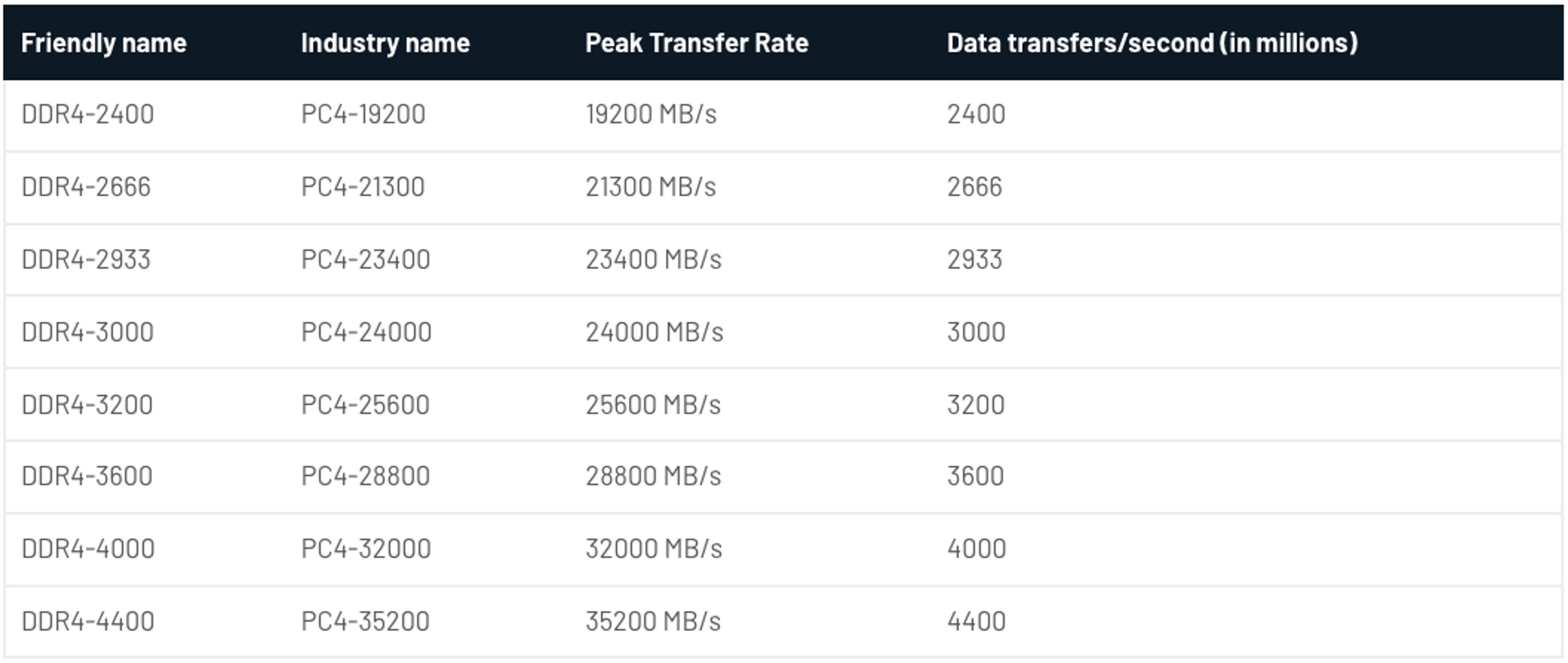
So if you should worry about RAM capacity rather than speed for most things, what are the exceptions?
There are two specific cases where speed would matter more than capacity:
- CPU-Bound Games and Esports Titles: RAM speed matters more in games that rely heavily on the CPU rather than the GPU, like competitive esports titles and CPU-intensive games running at lower resolutions like 1080p.
- Integrated Graphics (APUs): This is one of the biggest real-world cases where RAM speed matters. Systems with integrated graphics don’t have dedicated video memory, so the GPU uses RAM. Faster RAM increases memory bandwidth, noticeably improving speed and gaming performance.
Other than that, the most important area RAM speed matters is whether or not it’s compatible with your motherboard. Motherboards, especially across generations, can handle different maximum RAM speeds. Some motherboards may only go up to 3000 MHz RAM, so if you buy 3200 MHz RAM, you’re wasting your money. Sure, it’ll still work, but your RAM is going to be running at the motherboard's maximum rather than the RAM's maximum.
For example, take a look at the RAM compatibility for the ASUS ROG Strix Z490-E Gaming motherboard:
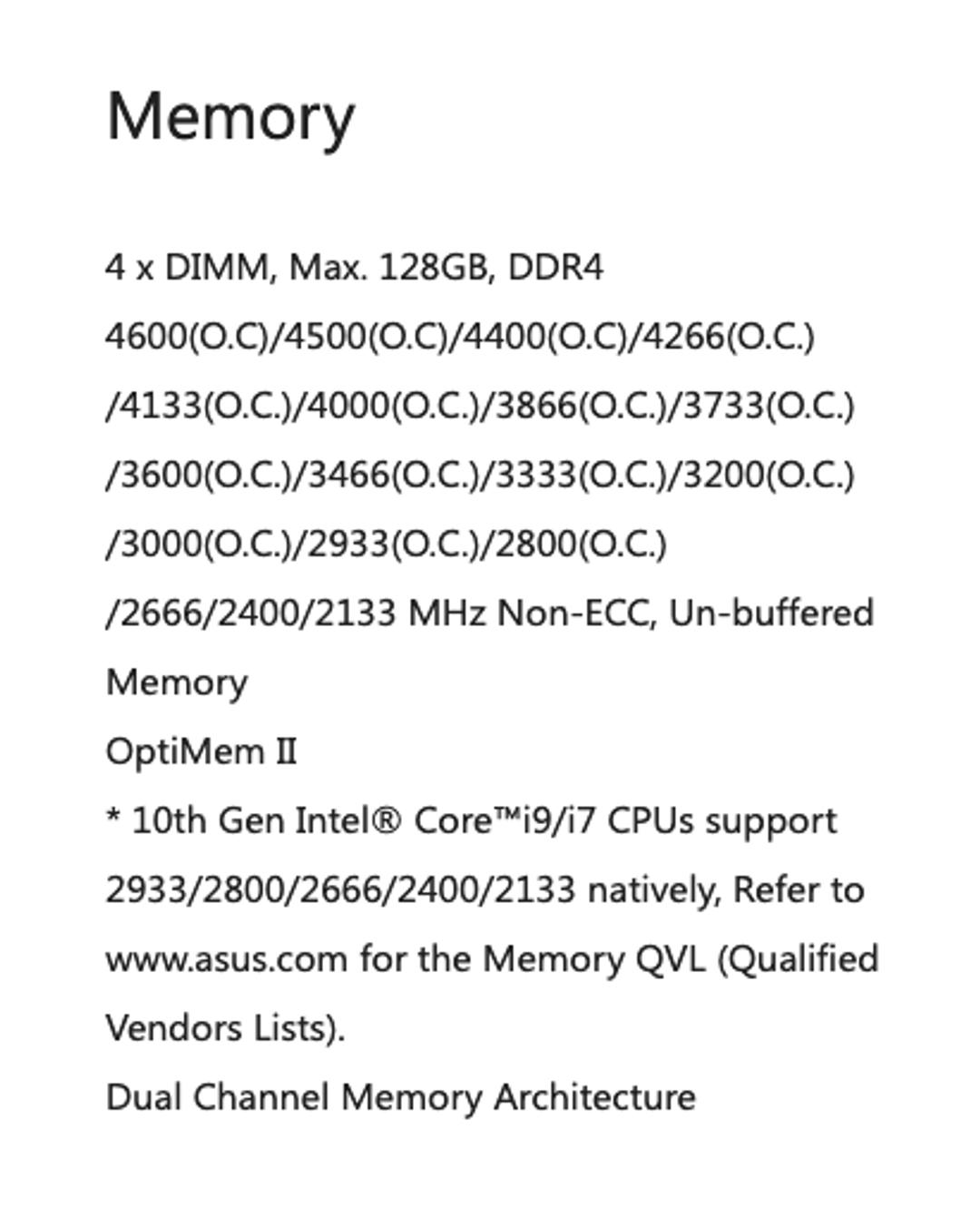
You can see that the motherboard supports any DDR4 RAM at those frequencies. You can also see that without overclocking, the speeds are limited to 2666 MHz. Purchasing 4000 MHz RAM for that board would be complete overkill if you have no plans to overclock or to push your system to the limit.
Motherboard Compatibility Still Matters
RAM speed is limited by your motherboard and CPU. If your motherboard supports up to 3000 MHz and you install 3200 MHz RAM, the memory will simply run at the lower supported speed.
Always check your motherboard’s memory specifications to avoid paying for speed you can’t use. Faster kits only make sense if your platform supports them.
Matched Pairs
In addition to making sure your motherboard can use the RAM, monitor RAM speed when mixing and matching RAM sticks. Mixing RAM sticks with different speeds forces all memory to run at the slowest speed installed. While mixing modules can work, it’s best to use matched kits to ensure stable performance.
Running RAM in dual-channel mode is also critical, especially for gaming and integrated graphics systems. Two sticks of RAM perform noticeably better than one.
DDR4 Versus DDR5
In 2021, DDR5 joined the game, offering higher data transfer rates, increased capacity, improved power efficiency, and potential latency improvements over DDR4. However, RAM speed isn’t going to make a gigantic impact on your gaming experience. DDR4 remains a capable, widely used RAM technology that provides good performance for many computing tasks. When choosing between DDR4 and DDR5, consider compatibility with your motherboard and CPU, as well as your specific computing needs and budget.
When DDR5 becomes affordable, it will be a nice system upgrade that helps future-proof it for a few years. A gentle reminder: Even with DDR5, it’s going to be more about the number of gigs of RAM you have, not the speed.
For DDR4 RAM, the sweet spot for RAM speed is:
- 3200 MHz is the best balance of price and performance
- 3600 MHz offers diminishing returns for most users
- Slower speeds still perform well if capacity is sufficient
For DDR5, the RAM speed sweet spot is:
- 5600–6000 MHz provides the best value
- Faster kits show minimal gains unless you’re CPU-bound or using integrated graphics
Higher speeds exist, but for most builds, they’re unnecessary unless you’re chasing marginal performance improvements.
What About DDR6 RAM?
DDR6 is expected to arrive in the future with even higher bandwidth, but it is not yet available for consumer PCs. For now, it’s not something consumers need to consider when building or upgrading a system.
What is Good RAM Speed?
For most PC users and gamers, 16 GB is the minimum amount of RAM you should have, although 32 GB is recommended for most modern games and tasks. What’s most important is to prioritize capacity over speed.
For content creation, 32 GB is the minimum, although capacity is still more important than speed. If you’re doing a budget build, faster RAM can actually help, but you need dual-channel memory for it to be useful.
Does RAM Speed Even Matter?
Overall, RAM speed matters only once you have sufficient RAM. For most users, upgrading from 8 GB to 16 GB or from 16 GB to 32 GB will deliver far greater performance improvements than chasing higher memory speeds.
Think of RAM speed as a performance fine-tuner, not a foundation. Get the capacity you need first, choose a sensible speed, and your system will perform exactly as it should without wasting money.
Instead of wasting money on hardware you don’t need, you can design a PC case that matches your PC setup. At HYTE, our PC cases and accessories are built to add an aesthetic touch to any computer, whether it’s a certain color scheme or your favorite anime.
Featured Posts
Best Anime and VTuber PC Cases
Discover the best anime and VTuber PC cases, including officially licensed anime‑themed PC cases and custom VTuber PC cases to match your favorite characters.
Why the HYTE Y70 Is Worth It for Modern PC Builds
See why the HYTE Y70 stands out with panoramic glass, vertical GPU support, and strong cooling potential. Discover why it fits modern PC builds.

X50 Astral Orange Is Almost Here: Pick an Orange
The X50 Astral Orange is almost here, and we are turning up the heat in the best way we know how. It is time to celebrate the orange side of gaming.

Black Friday Gaming Gear & PC Deals 2025
HYTE Black Friday sales are here, and we’re excited to share the amazing deals we’ll be offering this year! Our Black Friday sales event is your chance to save big on some of our most popular products. From November 20th through December 2nd, enjoy incredible discounts on PC cases and gaming accessories that bring both performance and style to your setup. If you’re looking to upgrade, now’s the perfect time to do it with HYTE.
